|
Hi all,
I have a 2 million records dataset coded by some symbols. This symbols are repeated continuously. x y sy 1 df 2 rt 5 sy 6 Also, 2000 symbols are defined and I have a separate symbol dataset too (in another spss file). In this dataset symbols are linked to some variables. sy 4 df 3 rt 2 I would like to match the second dataset to 1st. Like this: sy 1 4 df 2 3 rt 5 2 sy 6 4... sy is repeated two times but still 4 is assigned for sy.. |
|
Administrator
|
see SORT CASES
see MATCH FILES (read up on TABLE and BY subcommands).
Please reply to the list and not to my personal email.
Those desiring my consulting or training services please feel free to email me. --- "Nolite dare sanctum canibus neque mittatis margaritas vestras ante porcos ne forte conculcent eas pedibus suis." Cum es damnatorum possederunt porcos iens ut salire off sanguinum cliff in abyssum?" |
|
a warning message : variables are not the same length.
|
|
Administrator
|
If your version of SPSS is new enough, use ALTER TYPE to standardize the formatting of string variables common to the two files before using MATCH FILES.
--
Bruce Weaver bweaver@lakeheadu.ca http://sites.google.com/a/lakeheadu.ca/bweaver/ "When all else fails, RTFM." PLEASE NOTE THE FOLLOWING: 1. My Hotmail account is not monitored regularly. To send me an e-mail, please use the address shown above. 2. The SPSSX Discussion forum on Nabble is no longer linked to the SPSSX-L listserv administered by UGA (https://listserv.uga.edu/). |
|
tried but still not working. I want to repeat the problem again.
Basically it is an assignment problem. when it sees `x` in dataset1, it assigns matching value `y` from dataset2 by creating a new column. |
|
Administrator
|
Please post your syntax and some small sample data sets that illustrate the problem. (You can use DATA LIST to create the sample data sets -- there are plenty of examples in the archives of this list, and in the Command Syntax Reference manual).
--
Bruce Weaver bweaver@lakeheadu.ca http://sites.google.com/a/lakeheadu.ca/bweaver/ "When all else fails, RTFM." PLEASE NOTE THE FOLLOWING: 1. My Hotmail account is not monitored regularly. To send me an e-mail, please use the address shown above. 2. The SPSSX Discussion forum on Nabble is no longer linked to the SPSSX-L listserv administered by UGA (https://listserv.uga.edu/). |
|
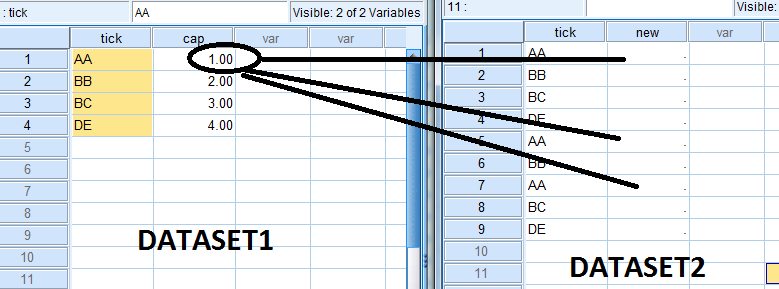
here is a illustration:
|
|
Administrator
|
As previously requested:
Please post SYNTAX and any error messages AFTER REVIEWING the full set of messages previously posted in this thread!!!
Please reply to the list and not to my personal email.
Those desiring my consulting or training services please feel free to email me. --- "Nolite dare sanctum canibus neque mittatis margaritas vestras ante porcos ne forte conculcent eas pedibus suis." Cum es damnatorum possederunt porcos iens ut salire off sanguinum cliff in abyssum?" |
|
DATASET ACTIVATE Set1.
SORT CASES BY tick(A). DATASET ACTIVATE Set2. SORT CASES BY tick(A). DATASET ACTIVATE Set1. MATCH FILES /FILE=* /TABLE='Set2' /BY tick. EXECUTE. It did not work. Because variables are not the same length and they are strings.. I have illustrated above. |
|
Administrator
|
"variables are not the same length and they are strings..."
---- Someone mentioned ALTER TYPE in the thread (Please review)! Try again please! --
Please reply to the list and not to my personal email.
Those desiring my consulting or training services please feel free to email me. --- "Nolite dare sanctum canibus neque mittatis margaritas vestras ante porcos ne forte conculcent eas pedibus suis." Cum es damnatorum possederunt porcos iens ut salire off sanguinum cliff in abyssum?" |
|
A David
said you might want to use ALTER TYPE. When the match failed
it should have given the kind of message that
this syntax does.
{note that lunch was constructed as if it were data filled in by people writing in what they ate.} Open a new instance of SPSS. Past the syntax below into a syntax window. Run it. Eyeball the output. data list list /fruit(A10). begin data Apple apple apples orange Orange Grape ggrape Plum plum end data. dataset name lunch. sort cases by fruit. data list list /fruit (A12) color (a12). begin data plum purple apple red grape purple orange orange end data. dataset name palette. sort cases by fruit. match files file= lunch /table = palette /by fruit. dataset activate lunch. alter type fruit (a=a12). match files file= lunch /table = palette /by fruit. dataset name matched. list. Art Kendall Social Research ConsultantsOn 1/22/2013 6:30 PM, David Marso wrote: "variables are not the same length and they are strings..." ---- Someone mentioned ALTER TYPE in the thread (Please review)! Try again please! -- fevziesen wroteDATASET ACTIVATE Set1. SORT CASES BY tick(A). DATASET ACTIVATE Set2. SORT CASES BY tick(A). DATASET ACTIVATE Set1. MATCH FILES /FILE=* /TABLE='Set2' /BY tick. EXECUTE. It did not work. Because variables are not the same length and they are strings.. I have illustrated above.----- Please reply to the list and not to my personal email. Those desiring my consulting or training services please feel free to email me. -- View this message in context: http://spssx-discussion.1045642.n5.nabble.com/About-matching-data-tp5717464p5717599.html Sent from the SPSSX Discussion mailing list archive at Nabble.com. ===================== To manage your subscription to SPSSX-L, send a message to [hidden email] (not to SPSSX-L), with no body text except the command. To leave the list, send the command SIGNOFF SPSSX-L For a list of commands to manage subscriptions, send the command INFO REFCARD ===================== To manage your subscription to SPSSX-L, send a message to [hidden email] (not to SPSSX-L), with no body text except the command. To leave the list, send the command SIGNOFF SPSSX-L For a list of commands to manage subscriptions, send the command INFO REFCARD
Art Kendall
Social Research Consultants |
| Free forum by Nabble | Edit this page |