GPL scatterplot - Break long value labels over lines?

classic Classic list List threaded Threaded
7 messages Options
Reply | Threaded
Open this post in threaded view
|

GPL scatterplot - Break long value labels over lines?

Ruben Geert van den Berg
Dear all,

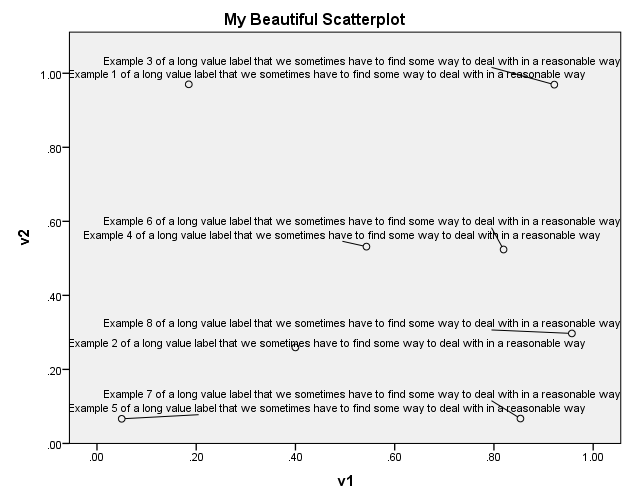
I want to create some scatterplots but the value labels of my identifier variable are rather long (example at end of post). Can I have them break over 2 or 3 lines in any way?

My first guess was adding something to the following lines in my chart template:

<addDataLabels colorByMarker="false" hidden="false">
<style color="#000000" font-size="8pt" font-style="regular" font-weight="regular" number="0" padding="2px" stroke-width="0.5pt" visible="visible"/>
<style color="transparent" color2="transparent" coordinate="1" number="1" visible="true"/>
<labeling variable="legend1"/>
</addDataLabels>

However, I've no clue what I could add here and I believe there's no documentation available on which XML attributes are available for SPSS chart templates in the first place.

All suggestions welcome!

Ruben

The syntax below illustrates the problem I'm having.

data list free/Aspect.
begin data
1 2 3 4 5 6 7 8
end data.

add value labels aspect 1 'Example 1 of a long value label that we sometimes have to find some way to deal with in a reasonable way'.
add value labels aspect 2 'Example 2 of a long value label that we sometimes have to find some way to deal with in a reasonable way'.
add value labels aspect 3 'Example 3 of a long value label that we sometimes have to find some way to deal with in a reasonable way'.
add value labels aspect 4 'Example 4 of a long value label that we sometimes have to find some way to deal with in a reasonable way'.
add value labels aspect 5 'Example 5 of a long value label that we sometimes have to find some way to deal with in a reasonable way'.
add value labels aspect 6 'Example 6 of a long value label that we sometimes have to find some way to deal with in a reasonable way'.
add value labels aspect 7 'Example 7 of a long value label that we sometimes have to find some way to deal with in a reasonable way'.
add value labels aspect 8 'Example 8 of a long value label that we sometimes have to find some way to deal with in a reasonable way'.

set seed 1.
compute v1 = rv.uniform(0,1).
compute v2 = rv.uniform(0,1).

GGRAPH
  /GRAPHDATASET NAME="graphdataset" VARIABLES=v1 v2 Aspect MISSING=LISTWISE REPORTMISSING=NO
  /GRAPHSPEC SOURCE=INLINE.
BEGIN GPL
  SOURCE: s=userSource(id("graphdataset"))
  DATA: v1=col(source(s), name("v1"))
  DATA: v2=col(source(s), name("v2"))
  DATA: Aspect=col(source(s), name("Aspect"), unit.category())
  GUIDE: axis(dim(1), label("v1"))
  GUIDE: axis(dim(2), label("v2"))
  GUIDE: text.title(label("My Beautiful Scatterplot"))
  ELEMENT: point(position(v1*v2), label(Aspect))
END GPL.


Reply | Threaded
Open this post in threaded view
|

Re: GPL scatterplot - Break long value labels over lines?

Andy W
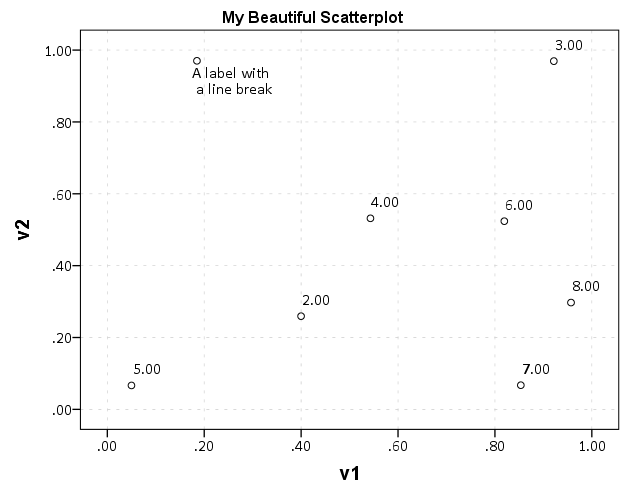
value labels aspect 1 'A label with \n a line break'.

GGRAPH
  /GRAPHDATASET NAME="graphdataset" VARIABLES=v1 v2 Aspect MISSING=LISTWISE REPORTMISSING=NO
  /GRAPHSPEC SOURCE=INLINE.
BEGIN GPL
  SOURCE: s=userSource(id("graphdataset"))
  DATA: v1=col(source(s), name("v1"))
  DATA: v2=col(source(s), name("v2"))
  DATA: Aspect=col(source(s), name("Aspect"), unit.category())
  GUIDE: axis(dim(1), label("v1"))
  GUIDE: axis(dim(2), label("v2"))
  GUIDE: text.title(label("My Beautiful Scatterplot"))
  ELEMENT: point(position(v1*v2), label(Aspect))
END GPL.

Andy W
apwheele@gmail.com
http://andrewpwheeler.wordpress.com/
Reply | Threaded
Open this post in threaded view
|

Re: GPL scatterplot - Break long value labels over lines?

Jon Peck
In reply to this post by Ruben Geert van den Berg
You can insert \n in the label to create a break in the label in the chart or in a pivot table.

On Mon, Mar 7, 2016 at 11:37 AM, Ruben Geert van den Berg <[hidden email]> wrote:
Dear all,

I want to create some scatterplots but the value labels of my identifier
variable are rather long (example at end of post). Can I have them break
over 2 or 3 lines in any way?

My first guess was adding something to the following lines in my *chart
template*:

<addDataLabels colorByMarker="false" hidden="false">
<style color="#000000" font-size="8pt" font-style="regular"
font-weight="regular" number="0" padding="2px" stroke-width="0.5pt"
visible="visible"/>
<style color="transparent" color2="transparent" coordinate="1" number="1"
visible="true"/>
<labeling variable="legend1"/>
</addDataLabels>

However, I've no clue what I could add here and I believe there's no
documentation available on which XML attributes are available for SPSS chart
templates in the first place.

All suggestions welcome!

Ruben

The syntax below illustrates the problem I'm having.

data list free/Aspect.
begin data
1 2 3 4 5 6 7 8
end data.

add value labels aspect 1 'Example 1 of a long value label that we sometimes
have to find some way to deal with in a reasonable way'.
add value labels aspect 2 'Example 2 of a long value label that we sometimes
have to find some way to deal with in a reasonable way'.
add value labels aspect 3 'Example 3 of a long value label that we sometimes
have to find some way to deal with in a reasonable way'.
add value labels aspect 4 'Example 4 of a long value label that we sometimes
have to find some way to deal with in a reasonable way'.
add value labels aspect 5 'Example 5 of a long value label that we sometimes
have to find some way to deal with in a reasonable way'.
add value labels aspect 6 'Example 6 of a long value label that we sometimes
have to find some way to deal with in a reasonable way'.
add value labels aspect 7 'Example 7 of a long value label that we sometimes
have to find some way to deal with in a reasonable way'.
add value labels aspect 8 'Example 8 of a long value label that we sometimes
have to find some way to deal with in a reasonable way'.

set seed 1.
compute v1 = rv.uniform(0,1).
compute v2 = rv.uniform(0,1).

GGRAPH
  /GRAPHDATASET NAME="graphdataset" VARIABLES=v1 v2 Aspect MISSING=LISTWISE
REPORTMISSING=NO
  /GRAPHSPEC SOURCE=INLINE.
BEGIN GPL
  SOURCE: s=userSource(id("graphdataset"))
  DATA: v1=col(source(s), name("v1"))
  DATA: v2=col(source(s), name("v2"))
  DATA: Aspect=col(source(s), name("Aspect"), unit.category())
  GUIDE: axis(dim(1), label("v1"))
  GUIDE: axis(dim(2), label("v2"))
  GUIDE: text.title(label("My Beautiful Scatterplot"))
  ELEMENT: point(position(v1*v2), label(Aspect))
END GPL.


<http://spssx-discussion.1045642.n5.nabble.com/file/n5731678/spss-scatterplot-long-value-labels.png>


--
View this message in context: http://spssx-discussion.1045642.n5.nabble.com/GPL-scatterplot-Break-long-value-labels-over-lines-tp5731678.html
Sent from the SPSSX Discussion mailing list archive at Nabble.com.

=====================
To manage your subscription to SPSSX-L, send a message to
[hidden email] (not to SPSSX-L), with no body text except the
command. To leave the list, send the command
SIGNOFF SPSSX-L
For a list of commands to manage subscriptions, send the command
INFO REFCARD


--
Jon K Peck
[hidden email]

===================== To manage your subscription to SPSSX-L, send a message to [hidden email] (not to SPSSX-L), with no body text except the command. To leave the list, send the command SIGNOFF SPSSX-L For a list of commands to manage subscriptions, send the command INFO REFCARD
Reply | Threaded
Open this post in threaded view
|

Re: GPL scatterplot - Break long value labels over lines?

Ruben Geert van den Berg
Thanks for the suggestion!

However, this requires me to insert "\n" into each long value label manually.

Can't I have a chart template break them for me? It would save me a lot of work and I wouldn't have to bother my students with such additional steps.

Thanks!

Ruben
Reply | Threaded
Open this post in threaded view
|

Re: GPL scatterplot - Break long value labels over lines?

Jon Peck
I don't think there is a way to put that into a chart template.  You could, of course, write a little Python script to edit the labels and run this, perhaps preceded by TEMPORARY.

On Mon, Mar 7, 2016 at 12:46 PM, Ruben Geert van den Berg <[hidden email]> wrote:
Thanks for the suggestion!

However, this requires me to insert "\n" into each long value label
manually.

Can't I have a chart template break them for me? It would save me a lot of
work and I wouldn't have to bother my students with such additional steps.

Thanks!

Ruben


--
View this message in context: http://spssx-discussion.1045642.n5.nabble.com/GPL-scatterplot-Break-long-value-labels-over-lines-tp5731678p5731681.html
Sent from the SPSSX Discussion mailing list archive at Nabble.com.

=====================
To manage your subscription to SPSSX-L, send a message to
[hidden email] (not to SPSSX-L), with no body text except the
command. To leave the list, send the command
SIGNOFF SPSSX-L
For a list of commands to manage subscriptions, send the command
INFO REFCARD


--
Jon K Peck
[hidden email]

===================== To manage your subscription to SPSSX-L, send a message to [hidden email] (not to SPSSX-L), with no body text except the command. To leave the list, send the command SIGNOFF SPSSX-L For a list of commands to manage subscriptions, send the command INFO REFCARD
Reply | Threaded
Open this post in threaded view
|

Re: GPL scatterplot - Break long value labels over lines?

Ruben Geert van den Berg
Thanks Jon!

I'd been thinking about that as well but it kinda feels like "reinventing the wheel". Besides, it'll add complexity to an already complex project. But perhaps I'll do so in the end anyway.

I was hoping for an easier solution by using some long forgotten but nicely implemented feature.

Best,

Ruben
Reply | Threaded
Open this post in threaded view
|

Re: GPL scatterplot - Break long value labels over lines?

Bruce Weaver
Administrator
In reply to this post by Jon Peck
I guess I never studied the FM entry for VALUE LABELS closely enough, as I did not know this!  Here is the relevant bullet point from the FM:

"To control line wrapping of labels in pivot tables and charts, insert \n as part of the label wherever you want a line break. The \n is not displayed in output; it is interpreted as a line-break character. (Note: Labels will always wrap wherever \n appears in the defined label, even if there is enough space to display the label without wrapping.)"


Jon Peck wrote
You can insert \n in the label to create a break in the label in the chart
or in a pivot table.

On Mon, Mar 7, 2016 at 11:37 AM, Ruben Geert van den Berg <
[hidden email]> wrote:

> Dear all,
>
> I want to create some scatterplots but the value labels of my identifier
> variable are rather long (example at end of post). Can I have them break
> over 2 or 3 lines in any way?
>
> My first guess was adding something to the following lines in my *chart
> template*:
>
> <addDataLabels colorByMarker="false" hidden="false">
> <style color="#000000" font-size="8pt" font-style="regular"
> font-weight="regular" number="0" padding="2px" stroke-width="0.5pt"
> visible="visible"/>
> <style color="transparent" color2="transparent" coordinate="1" number="1"
> visible="true"/>
> <labeling variable="legend1"/>
> </addDataLabels>
>
> However, I've no clue what I could add here and I believe there's no
> documentation available on which XML attributes are available for SPSS
> chart
> templates in the first place.
>
> All suggestions welcome!
>
> Ruben
>
> The syntax below illustrates the problem I'm having.
>
> data list free/Aspect.
> begin data
> 1 2 3 4 5 6 7 8
> end data.
>
> add value labels aspect 1 'Example 1 of a long value label that we
> sometimes
> have to find some way to deal with in a reasonable way'.
> add value labels aspect 2 'Example 2 of a long value label that we
> sometimes
> have to find some way to deal with in a reasonable way'.
> add value labels aspect 3 'Example 3 of a long value label that we
> sometimes
> have to find some way to deal with in a reasonable way'.
> add value labels aspect 4 'Example 4 of a long value label that we
> sometimes
> have to find some way to deal with in a reasonable way'.
> add value labels aspect 5 'Example 5 of a long value label that we
> sometimes
> have to find some way to deal with in a reasonable way'.
> add value labels aspect 6 'Example 6 of a long value label that we
> sometimes
> have to find some way to deal with in a reasonable way'.
> add value labels aspect 7 'Example 7 of a long value label that we
> sometimes
> have to find some way to deal with in a reasonable way'.
> add value labels aspect 8 'Example 8 of a long value label that we
> sometimes
> have to find some way to deal with in a reasonable way'.
>
> set seed 1.
> compute v1 = rv.uniform(0,1).
> compute v2 = rv.uniform(0,1).
>
> GGRAPH
>   /GRAPHDATASET NAME="graphdataset" VARIABLES=v1 v2 Aspect MISSING=LISTWISE
> REPORTMISSING=NO
>   /GRAPHSPEC SOURCE=INLINE.
> BEGIN GPL
>   SOURCE: s=userSource(id("graphdataset"))
>   DATA: v1=col(source(s), name("v1"))
>   DATA: v2=col(source(s), name("v2"))
>   DATA: Aspect=col(source(s), name("Aspect"), unit.category())
>   GUIDE: axis(dim(1), label("v1"))
>   GUIDE: axis(dim(2), label("v2"))
>   GUIDE: text.title(label("My Beautiful Scatterplot"))
>   ELEMENT: point(position(v1*v2), label(Aspect))
> END GPL.
>
>
> <
> http://spssx-discussion.1045642.n5.nabble.com/file/n5731678/spss-scatterplot-long-value-labels.png
> >
>
>
>
> --
> View this message in context:
> http://spssx-discussion.1045642.n5.nabble.com/GPL-scatterplot-Break-long-value-labels-over-lines-tp5731678.html
> Sent from the SPSSX Discussion mailing list archive at Nabble.com.
>
> =====================
> To manage your subscription to SPSSX-L, send a message to
> [hidden email] (not to SPSSX-L), with no body text except the
> command. To leave the list, send the command
> SIGNOFF SPSSX-L
> For a list of commands to manage subscriptions, send the command
> INFO REFCARD
>


--
Jon K Peck
[hidden email]

=====================
To manage your subscription to SPSSX-L, send a message to
[hidden email] (not to SPSSX-L), with no body text except the
command. To leave the list, send the command
SIGNOFF SPSSX-L
For a list of commands to manage subscriptions, send the command
INFO REFCARD
--
Bruce Weaver
bweaver@lakeheadu.ca
http://sites.google.com/a/lakeheadu.ca/bweaver/

"When all else fails, RTFM."

PLEASE NOTE THE FOLLOWING: 
1. My Hotmail account is not monitored regularly. To send me an e-mail, please use the address shown above.
2. The SPSSX Discussion forum on Nabble is no longer linked to the SPSSX-L listserv administered by UGA (https://listserv.uga.edu/).