|
I know you can change the color and font of the commands, subcommands, keywords, values, comments, and quotes; but after many hours of working in the syntax editor my eyes get tired. I am currently using version 19, I was wondering if there was a way to change the background color in the syntax editor. I know many programs with the feature and would love to be able to do this for eye strain and color contrasts of the syntax.
|
|
I am so down with this request. In fact, I am changing the background on all of the programs I use to create less eyestrain. Macro's are good to toggle back and forth (so I don't send my colorized document to my boss. She might think I was flaky.)
Help us Obi-Wan. Sam Michalowski PhD Director, Office of Institutional Research and Assessment College of Staten Island/CUNY 718-982-2007 Sam.Michalowski@csi.cuny.edu |
|
I'm pretty sure if you set SPSS to have the current windows theme and then set your windows theme to Hi-contrast that it'll work, could be wrong though :P
"Lo there do I see my father. Lo there do I see my mother and my sisters and my brothers. Lo there do I see the line of my people, back to the beginning. Lo, they do call to me, they bid me take my place among them, in the Halls of Valhalla, where the brave may live...forever." |
|
hi all,
did anyone get this to work? because just setting the windows theme and then choosing high contrast does not work. For example, you will get black background in the Notepad, but not in the SPSS syntax editor. |
|
This post was updated on .
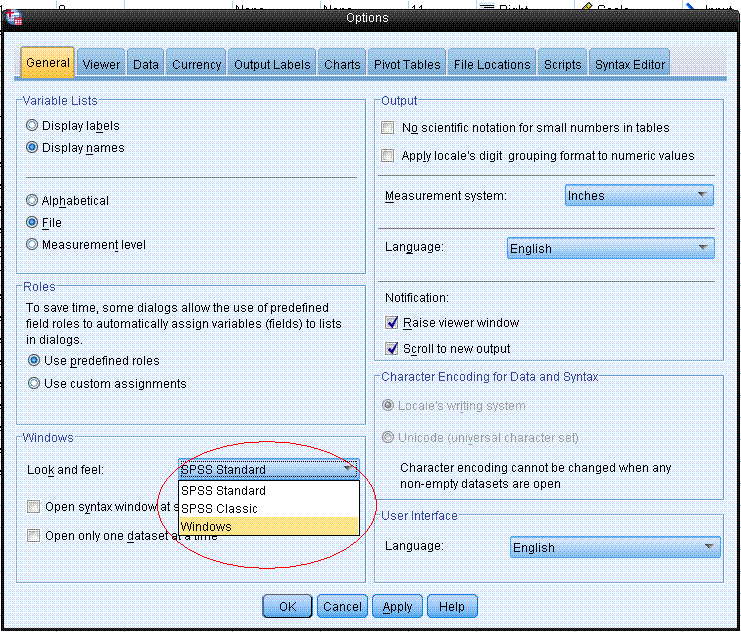
Have you made sure that the SPSS them is set to 'Windows theme' in the general tab on the spss options
menu: ![]() If this option isn't set the backgrounds etc. will remain in the default spss theme colours. Also if you are feeling brave some of the .XSD files can be edited in the SPSS directory that might help you to do things with the colour and layout. Use a text editor to open then (Always back up files before editing files a program uses.) The .XSL files are XML and it lists things like this: <xs:attributeGroup name="border-padding-background-properties"> <xs:attribute name="background"/> <xs:attribute name="background-attachment"> <xs:simpleType> <xs:restriction base="xs:token"> <xs:enumeration value="scroll"/> <xs:enumeration value="fixed"/> <xs:enumeration value="inherit"/> </xs:restriction> </xs:simpleType> </xs:attribute> "Lo there do I see my father. Lo there do I see my mother and my sisters and my brothers. Lo there do I see the line of my people, back to the beginning. Lo, they do call to me, they bid me take my place among them, in the Halls of Valhalla, where the brave may live...forever." |
|
Thanks, works fine.
|
|
In reply to this post by Tom1234
Tom,
That did it. My eyes thank you!
Sam
From: Tom1234 [via SPSSX Discussion] [ml-node+[hidden email]]
Sent: Tuesday, November 20, 2012 7:08 AM To: Sam Michalowski Subject: Re: Version 19: Background color Have you made sure that the SPSS them is set to 'Windows theme' in the general tab on the spss options
menu: ![]() If this option isn't set the backgrounds etc. will remain in the default spss theme colours. "Lo there do I see my father. Lo there do I see my mother and my sisters and my brothers. Lo there do I see the line of my people, back to the beginning. Lo, they do call to me, they bid me take my place among them, in the Halls of Valhalla, where the brave may live...forever." If you reply to this email, your message will be added to the discussion below:
http://spssx-discussion.1045642.n5.nabble.com/Version-19-Background-color-tp3406821p5716342.html
Washington Monthly magazine ranks the College of Staten Island as one of “America’s Best-Bang-for-the-Buck Colleges” |
| Free forum by Nabble | Edit this page |