Data cleaning using Scratch variables


 Locked


Data cleaning using Scratch variables
 
|
Hi:
Before I create final processed SPSS file I have to do some data cleaning on the initial Raw file. Hence I want to use Scartch variables in the process. So below is the syntax for the 3 variables for testing purpose. DATA LIST LIST / SERIAL NCB MC. BEGIN DATA. 1,2,1 2,5,3 3,3,2 4,,4 5,6,3 END DATA. VALUE LABELS / MC 1 "Brand1" 2 "Brand2" 3 "Brand3" 4 "Brand4" 5 "Brand5". Now the Question is : "The respondent who answers more than 2 at NCB variable - the data should be cleaned at the variable MC" so I am using the scratch variable to move the cleaned data to #MC and finally I am moving back to the original variable i.e. 'MC'. In order to execute the same I have written the syntax as: IF(NCB ge 3) #MC=MC. Compute MC = #MC. EXECUTE. Now after executing the same the results seems to be wrong. I have observed that where ever the data is blank in the variable NCB the data in 'MC'(Cleaned one) has the above value of 'MC' (original). Please let me know how this can be overcome when using the scratch variables? 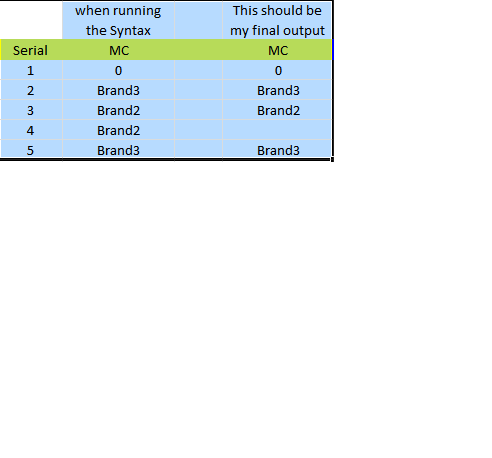 |
Re: Data cleaning using Scratch variables

|
Read about the behaviour of sctratch variables in the Command Syntax
Reference.
Scratch variables, unlike standard variables, are initialized for case_1 as 0 and are initialized for every case_i as the value of case_(i-1). And so, whenewer "IF(NCB ge 3) #MC=MC" don't go off for a case, "Compute MC = #MC" retains the value from the previous case. ===================== To manage your subscription to SPSSX-L, send a message to [hidden email] (not to SPSSX-L), with no body text except the command. To leave the list, send the command SIGNOFF SPSSX-L For a list of commands to manage subscriptions, send the command INFO REFCARD |
Re: Data cleaning using Scratch variables
|
|
Could you please let me know how my syntax should be?
|
Re: Data cleaning using Scratch variables
|
|
You got a good reply from Kirill on how scratch variables work.
This statement doesn't make any sense, perhaps there is a technical language issue. Now the Question is : "The respondent who answers more than 2 at NCB variable - the data should be cleaned at the variable MC" so I am using the scratch variable to move the cleaned data to #MC and finally I am moving back to the original variable i.e. 'MC'. My question: Case 2 (serial=2) has a value of 5 for NCB, which is greater than 2, and is a problem. What is the value of NCB supposed to be for that case? What is the rule for computing it? Same question for case 5. What is the value supposed to be? Gene Maguin DATA LIST LIST / SERIAL NCB MC. BEGIN DATA. 1,2,1 2,5,3 3,3,2 4,,4 5,6,3 END DATA. VALUE LABELS / MC 1 "Brand1" 2 "Brand2" 3 "Brand3" 4 "Brand4" 5 "Brand5". Now the Question is : "The respondent who answers more than 2 at NCB variable - the data should be cleaned at the variable MC" so I am using the scratch variable to move the cleaned data to #MC and finally I am moving back to the original variable i.e. 'MC'. In order to execute the same I have written the syntax as: IF(NCB ge 3) #MC=MC. Compute MC = #MC. EXECUTE. -----Original Message----- From: SPSSX(r) Discussion [mailto:[hidden email]] On Behalf Of jagadishpchary Sent: Monday, August 17, 2015 9:25 AM To: [hidden email] Subject: Re: Data cleaning using Scratch variables Could you please let me know how my syntax should be? -- View this message in context: http://spssx-discussion.1045642.n5.nabble.com/Data-cleaning-using-Scratch-variables-tp5730444p5730446.html Sent from the SPSSX Discussion mailing list archive at Nabble.com. ===================== To manage your subscription to SPSSX-L, send a message to [hidden email] (not to SPSSX-L), with no body text except the command. To leave the list, send the command SIGNOFF SPSSX-L For a list of commands to manage subscriptions, send the command INFO REFCARD ===================== To manage your subscription to SPSSX-L, send a message to [hidden email] (not to SPSSX-L), with no body text except the command. To leave the list, send the command SIGNOFF SPSSX-L For a list of commands to manage subscriptions, send the command INFO REFCARD |
Re: Data cleaning using Scratch variables

Administrator
|
In reply to this post by jagadishpchary
Why are you doing the first conditionally and not the second?
Maybe look up DO IF -END IF in the FM??? This code doesn't really do anything. Stick value from variable in scratch. Immediately stick scratch in same variable? Scratching my head puzzled by this nonsense.
Please reply to the list and not to my personal email.
Those desiring my consulting or training services please feel free to email me. --- "Nolite dare sanctum canibus neque mittatis margaritas vestras ante porcos ne forte conculcent eas pedibus suis." Cum es damnatorum possederunt porcos iens ut salire off sanguinum cliff in abyssum?" |

Re: Data cleaning using Scratch variables

Administrator
|
In reply to this post by Maguin, Eugene
As Gene notes, it is not at all clear what "cleaning" means. Does it mean setting to a value of 0? Does this do what you want?
DATA LIST LIST / SERIAL NCB MC. BEGIN DATA. 1,2,1 2,5,3 3,3,2 4,,4 5,6,3 END DATA. COMPUTE MC.cleaned = MC. IF(NCB ge 3) MC.cleaned=0. FORMATS ALL (F1). LIST. OUTPUT: SERIAL NCB MC MC.cleaned 1 2 1 1 2 5 3 0 3 3 2 0 4 . 4 4 5 6 3 0 Number of cases read: 5 Number of cases listed: 5
--
Bruce Weaver bweaver@lakeheadu.ca http://sites.google.com/a/lakeheadu.ca/bweaver/ "When all else fails, RTFM." PLEASE NOTE THE FOLLOWING: 1. My Hotmail account is not monitored regularly. To send me an e-mail, please use the address shown above. 2. The SPSSX Discussion forum on Nabble is no longer linked to the SPSSX-L listserv administered by UGA (https://listserv.uga.edu/). |
Re: Data cleaning using Scratch variables
|
|
There was a typo error in my earlier post..it should be "The respondent who answers less than or equal to 2 at NCB variable - the data should be cleaned at the variable MC". Bruce: Thanks for the code. I don't want to create a new variable instead I want to do the cleaning processing using the scratch variables. let me know if this can be done. |
Re: Data cleaning using Scratch variables

|
I would be very leery of writing over a variable especially if you are a beginner.
Be sure that as you draft and redraft your analysis you are able to back and do it over the way that you intend.
Art Kendall
Social Research Consultants |
Re: Data cleaning using Scratch variables
|
Administrator
|
In reply to this post by jagadishpchary
Note that the second compute is NOT under the scope of the IF clause.
Please consult the FM for DO IF/END IF!!! Ever seen the movie Cool Hand Luke???? ----
Please reply to the list and not to my personal email.
Those desiring my consulting or training services please feel free to email me. --- "Nolite dare sanctum canibus neque mittatis margaritas vestras ante porcos ne forte conculcent eas pedibus suis." Cum es damnatorum possederunt porcos iens ut salire off sanguinum cliff in abyssum?" |
Re: Data cleaning using Scratch variables
|
Administrator
|
If the "Cool Hand Luke" reference is not working for you, take a look at this:
http://makeapowerfulpoint.com/wp-content/uploads/2014/06/What-we-got-here-is-01.png There are still questions you (the OP) need to answer. E.g., 1. What does "cleaning" variable MC mean? Does it mean setting it to 0? 2. Why do you feel you need to use scratch variables? 3. Does the following do what you want (bearing in mind Art Kendall's very good comment on the dangers of over-writing an existing variable)? DATA LIST LIST / SERIAL NCB MC (3F1). BEGIN DATA. 1,2,1 2,5,3 3,3,2 4,,4 5,6,3 END DATA. * The ORIGINAL data. LIST. * "Clean" variable MC if NCB LE 2. IF(NCB LE 2) MC=0. * The data AFTER "cleaining". LIST. 4. If that does NOT produce the result you want, where is it going wrong?
--
Bruce Weaver bweaver@lakeheadu.ca http://sites.google.com/a/lakeheadu.ca/bweaver/ "When all else fails, RTFM." PLEASE NOTE THE FOLLOWING: 1. My Hotmail account is not monitored regularly. To send me an e-mail, please use the address shown above. 2. The SPSSX Discussion forum on Nabble is no longer linked to the SPSSX-L listserv administered by UGA (https://listserv.uga.edu/). |
Re: Data cleaning using Scratch variables
|
|
Here are my answers for your questions..
Item #1: Yes, I need to make all the invalid data to ‘0’ by applying the condition (NCB le 2). As an example I have provided 2 variables – but my data set has many variables with different filter conditions. Item #2: Yes, I have to use Scratch variables – Since my data set has too many variables and if I create new variables - the number would increase and which will lead to confusion. Item #3: The method you suggested is what I already aware. However, I would like to know using Scratch variables is there any solution? |
Re: Data cleaning using Scratch variables
|
|
??? You don't want to save the old value. You don't want a solution in
=====================
To manage your subscription to SPSSX-L, send a message to
[hidden email] (not to SPSSX-L), with no body text except the
command. To leave the list, send the command
SIGNOFF SPSSX-L
For a list of commands to manage subscriptions, send the command
INFO REFCARD
one line that does not create anything extra. Okay. If there is not something that you are forgetting to tell us that *needs* a scratch variable .... * Just so I can say that I used a scratch variable. -- Rich Ulrich > Date: Tue, 18 Aug 2015 02:15:21 -0700 > From: [hidden email] > Subject: Re: Data cleaning using Scratch variables > To: [hidden email] > > Here are my answers for your questions.. > > Item #1: Yes, I need to make all the invalid data to ‘0’ by applying the > condition (NCB le 2). As an example I have provided 2 variables – but my > data set has many variables with different filter conditions. > > Item #2: Yes, I have to use Scratch variables – Since my data set has too > many variables and if I create new variables - the number would increase and > which will lead to confusion. > > Item #3: The method you suggested is what I already aware. However, I would > like to know using Scratch variables is there any solution? > |
«
Return to SPSSX Discussion
|
1 view|%1 views
| Free forum by Nabble | Edit this page |