How to display the base count when running percentages using CTables in SPSS


 Locked


How to display the base count when running percentages using CTables in SPSS
 
|
This post was updated on .
Hi:
I have generated a table for a variable "MBRAND" using CTABLES option. In general, the base count is given as 100% when i use the following syntax. WEIGHT BY WEIGHT_1. CTABLES /VLABELS VARIABLES =ALL DISPLAY=LABEL /TABLES (MBRAND) [COLPCT.COUNT] /SLABELS VISIBLE=NO /SLABELS POSITION=COLUMN /CATEGORIES VARIABLES=ALL ORDER=A KEY=VALUE EMPTY=EXCLUDE TOTAL=YES POSITION=BEFORE LABEL="TOTAL" . the table output is: MBRAND: MAIN BRAND TOTAL 100.0% Brand1 17.6% Brand2 26.1% Brand3 17.6% Brand4 26.0% Brand5 6.2% Brand6 4.1% Brand7 .4% Brand8 1.2% Brand9 .8% My question is : Is there any option where i can get the base count for "TOTAL" instead of 100%. I have searched all the CTABLE options however i could not find it - might be i don't have thorough knowledge about SPSS. please help me. the final table should be: MBRAND: MAIN BRAND TOTAL 2074 Brand1 17.6% Brand2 26.1% Brand3 17.6% Brand4 26.0% Brand5 6.2% Brand6 4.1% Brand7 .4% Brand8 1.2% Brand9 .8% |
Re: How to display the base count when running percentages using CTables in SPSS
|
|
Yes, you have an option of selecting different statistics for totals. Hopefully below notes shall help explain how to achieve this:
get file="C:\Program Files\IBM\SPSS\Statistics\23\Samples\English\Employee data.sav". CTABLES /VLABELS VARIABLES=jobcat DISPLAY=BOTH /TABLE jobcat [C][COLPCT.COUNT PCT40.1, TOTALS[COUNT F40.0]] /SLABELS POSITION=ROW /CATEGORIES VARIABLES=jobcat ORDER=A KEY=VALUE EMPTY=INCLUDE TOTAL=YES POSITION=AFTER MISSING=EXCLUDE. 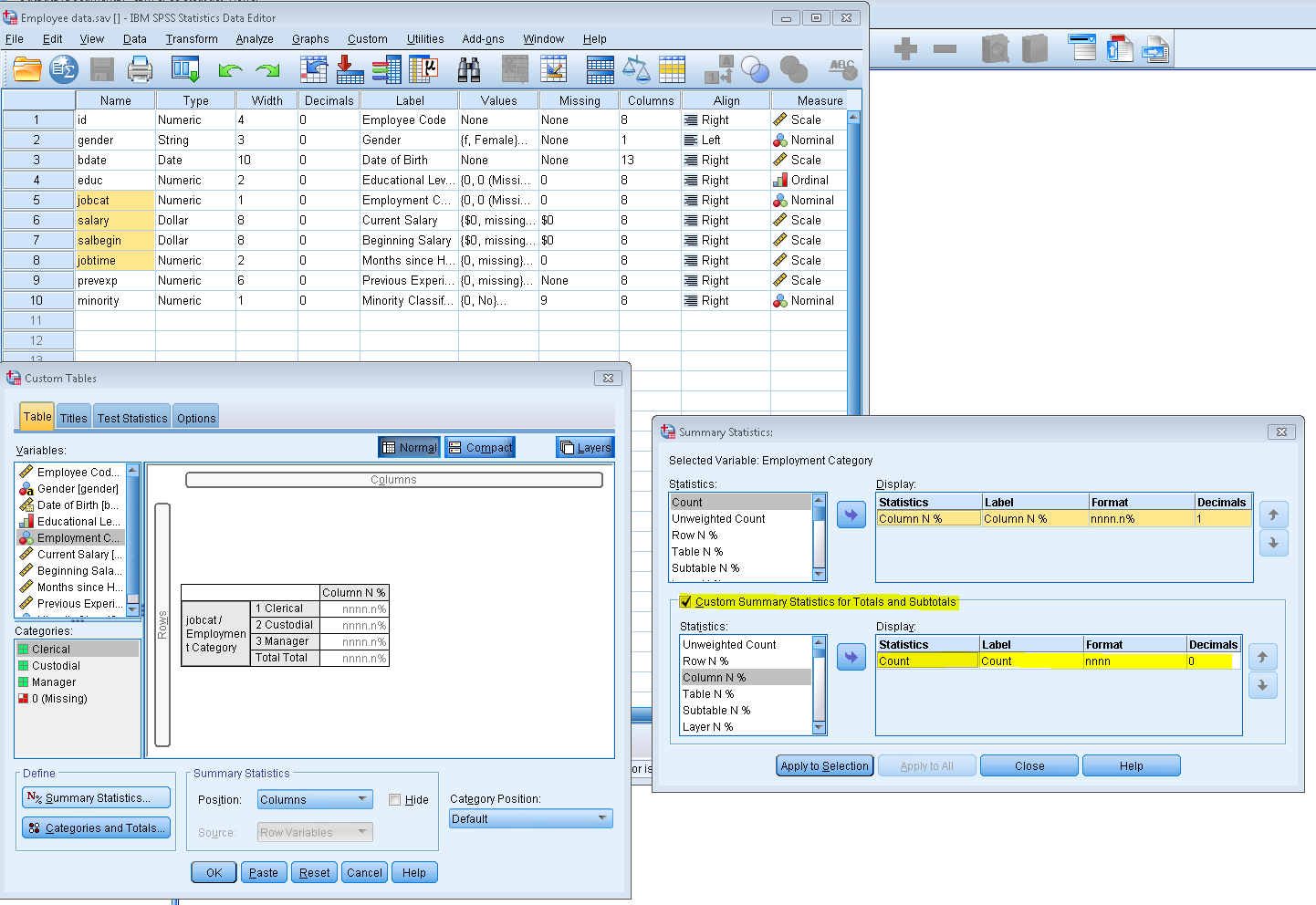 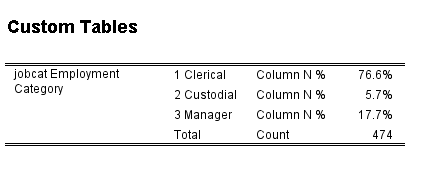
|
Re: How to display the base count when running percentages using CTables in SPSS

|
In reply to this post by jagadishpchary
Very interesting, Jignesh!
=====================
To manage your subscription to SPSSX-L, send a message to
[hidden email] (not to SPSSX-L), with no body text except the
command. To leave the list, send the command
SIGNOFF SPSSX-L
For a list of commands to manage subscriptions, send the command
INFO REFCARD
I did not realise this was possible. So many thanks from my side as well. GL, Mario jagadishpchary <[hidden email]> schrieb am 8:30 Donnerstag, 23.Juli 2015: Hi: I have generated a table for a variable "MBRAND" using CTABLES option. In general, the base count is given as 100% when i use the following syntax. WEIGHT BY WEIGHT_1. CTABLES /VLABELS VARIABLES =ALL DISPLAY=LABEL /TABLES (MBRAND) [COLPCT.COUNT] /SLABELS VISIBLE=NO /SLABELS POSITION=COLUMN /CATEGORIES VARIABLES=ALL ORDER=A KEY=VALUE EMPTY=EXCLUDE TOTAL=YES POSITION=BEFORE LABEL="TOTAL" . the table output is: MBRAND MAIN BRAND TOTAL 100.0% Brand1 17.6% Brand2 26.1% Brand3 17.6% Brand4 26.0% Brand5 6.2% Brand6 4.1% Brand7 .4% Brand8 1.2% Brand9 .8% My question is : Is there any option where i can get the base count for "TOTAL" instead of 100%. I have searched all the CTABLE options however i could not find it - might be i don't have thorough knowledge about SPSS. please help me. the final table should be: MBRAND MAIN BRAND TOTAL 2074 Brand1 17.6% Brand2 26.1% Brand3 17.6% Brand4 26.0% Brand5 6.2% Brand6 4.1% Brand7 .4% Brand8 1.2% Brand9 .8% -- View this message in context: http://spssx-discussion.1045642.n5.nabble.com/How-to-display-the-base-count-when-running-percentages-using-CTables-in-SPSS-tp5730260.html Sent from the SPSSX Discussion mailing list archive at Nabble.com. ===================== To manage your subscription to SPSSX-L, send a message to [hidden email] (not to SPSSX-L), with no body text except the command. To leave the list, send the command SIGNOFF SPSSX-L For a list of commands to manage subscriptions, send the command INFO REFCARD
Mario Giesel
Munich, Germany |
Creating a new variables based on highest scores of two variables
|
|
Dear list,
Would anyone please suggest a way of creating a new variable out of a repeated measure?
We have two measurements from students on the same variables, and we want to choose their best score for the analysis.
Thanks a lot in advance,
Ata
-------------------------------------------------------------------------------
Ata Ghaderi , Ph.D.
Clinical Psychologist, Licensed Psychotherapist
Professor
Division of Psychology
Department of Clinical Neuroscience, Karolinska Institutet
SE-171 77 Stockholm
Sweden
+46-08-524 832 48
+46-709996312
--------------------------------------------------------------------------------
|
Re: Creating a new variables based on highest scores of two variables
|
|
Ata, assuming you have two rows per respondent, AGGREGATE will probably do the job, like in AGGREGATE /OUTFILE=* /BREAK=respid /myvar_max=MAX(myvar). Otherwise use sth. like COMPUTE myvar_max = MAX(myvar1,myvar2). Good luck, Mario Ata Ghaderi <[hidden email]> schrieb am 12:28 Freitag, 21.August 2015:
Dear list,
Would anyone please suggest a way of creating a new variable out of a repeated measure?
We have two measurements from students on the same variables, and we want to choose their best score for the analysis.
Thanks a lot in advance,
Ata
-------------------------------------------------------------------------------
Ata Ghaderi , Ph.D.
Clinical Psychologist, Licensed Psychotherapist
Professor
Division of Psychology
Department of Clinical Neuroscience, Karolinska Institutet
SE-171 77 Stockholm
Sweden
+46-08-524 832 48
+46-709996312
--------------------------------------------------------------------------------
=====================
To manage your subscription to SPSSX-L, send a message to
[hidden email] (not to SPSSX-L), with no body text except the
command. To leave the list, send the command
SIGNOFF SPSSX-L
For a list of commands to manage subscriptions, send the command
INFO REFCARD
Mario Giesel
Munich, Germany |
Re: Creating a new variables based on highest scores of two variables

|
In reply to this post by Ata Ghaderi-2
Assuming you have x1 and X2 as first and second measures, try something like: Open your Data Editor: File >> new >> syntax and write in: compute X3 = max (x1,x2). (Don’t forget the stop!!) Run syntax with CRTL+R or green triangle. John F Hall (Mr) [Retired academic survey researcher] Email: [hidden email] Website: www.surveyresearch.weebly.com SPSS start page: www.surveyresearch.weebly.com/1-survey-analysis-workshop From: SPSSX(r) Discussion [mailto:[hidden email]] On Behalf Of Ata Ghaderi Dear list, Would anyone please suggest a way of creating a new variable out of a repeated measure? We have two measurements from students on the same variables, and we want to choose their best score for the analysis. Thanks a lot in advance, Ata ------------------------------------------------------------------------------- Ata Ghaderi , Ph.D. Clinical Psychologist, Licensed Psychotherapist Professor Division of Psychology Department of Clinical Neuroscience, Karolinska Institutet SE-171 77 Stockholm Sweden +46-08-524 832 48 +46-709996312 -------------------------------------------------------------------------------- ===================== To manage your subscription to SPSSX-L, send a message to [hidden email] (not to SPSSX-L), with no body text except the command. To leave the list, send the command SIGNOFF SPSSX-L For a list of commands to manage subscriptions, send the command INFO REFCARD |
| Free forum by Nabble | Edit this page |